
Table of Content
- How to Prepare Your Travel Platform for AI
- What Data Quality Do You Need Before Using AI in Travel Software
- Why your API Integrations Must be Stable Before Adding AI
- Where AI Belongs in Your Travel Software Architecture
- Common AI Integration Mistakes in Travel Platforms
- What Infrastructure Do You Need Before Building AI Features
Let's integrate AI correctly from the start
Book a callA team gets excited about AI, spins up a proof of concept, demos it to stakeholders, gets approval – and then spends three months untangling the mess they’ve created in production. The problem is almost never the AI itself. It’s the foundation underneath. AI integration is a bit like renovating a kitchen. You can buy the fanciest appliances on the market, but if your wiring can’t handle the load, you’re going to have a bad time. The unglamorous work needs to happen first. So before you start evaluating AI vendors or debating model architectures, let’s talk about what needs to be in place.
How to Prepare Your Travel Platform for AI
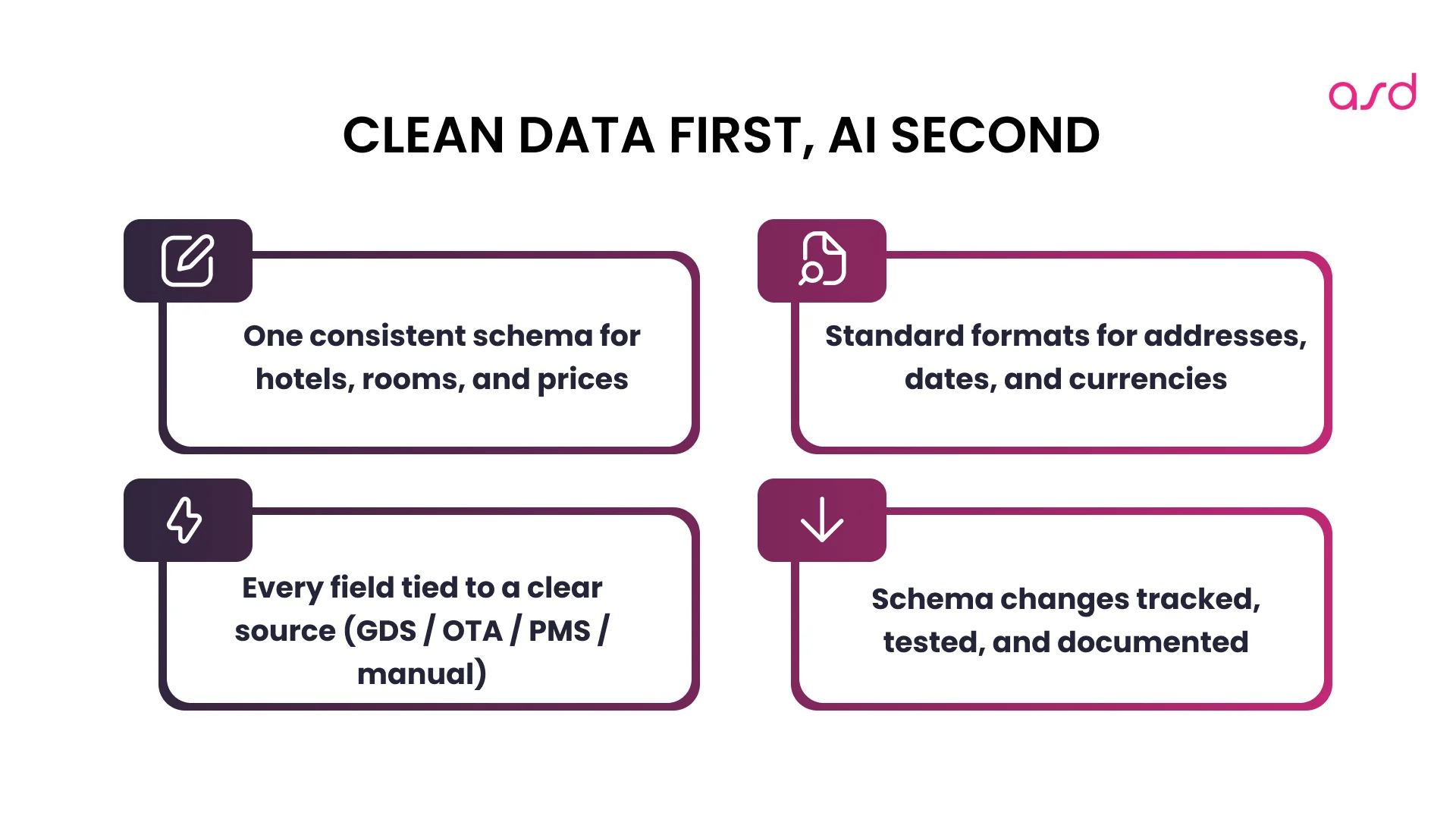
AI models reflect the quality of their inputs. Garbage in, garbage out isn’t just a cliché – it’s the number one reason AI projects fail in travel tech.
Take hotel data. If your database contains properties with mixed address formats (“123 Main St” versus “123 Main Street”), arbitrary room type naming (“Dlx King” versus “Deluxe Room – 1 King Bed”), and inconsistent currency handling, AI can’t reliably process any of it.
Find weak spots before AI breaks them
What You Need Before AI Touches Your Data
Consistent schema enforcement. Not aspirational standards in a wiki somewhere – actual validation that prevents malformed data from entering your system. Database constraints, API input validation, and automated checks that reject anything that doesn’t conform.
Normalized formats. Addresses, phone numbers, timestamps, currencies – all following a single standard. This sounds tedious because it is. It’s also non-negotiable. When you’re developing travel software, inconsistent data formats multiply your edge cases exponentially.
Clear data lineage. When a data point is wrong, you need to trace where it came from. If your hotel description is inaccurate, did it come from the GDS feed, a supplier API, or manual entry? Without lineage, debugging AI behavior becomes guesswork.
Version control for your data structure. Your data schema will evolve. When you add new fields or change existing ones, you need to know how that affects your AI models. Document everything. Track migrations. Test model performance after each schema change.
I realize this isn’t the sexy AI content you were hoping for. But teams that skip data quality spend three times as long debugging AI issues later.
Discover how to build an AI trip planner app using GPT-4, travel APIs, and ready-made tools
What Data Quality Do You Need Before Using AI in Travel Software
AI models need training data. For travel platforms, that means user behavior: searches, clicks, bookings, cancellations. It also means system behavior: API response times, error rates, conversion funnels.
Many teams you may work with have decent logging for debugging production issues but almost nothing that’s useful for AI training.
Building AI-Ready Logging Infrastructure
Structured formats. JSON logs that can be queried and aggregated, not unstructured text strings that require regex parsing. Every log entry should be machine-readable and capture complete context: user ID, session ID, timestamp, action taken, results shown, selections made.
Correlation IDs. Every request should have an ID that follows it through your entire system. When a user searches, clicks, and books, you need to connect those events. This is crucial for understanding conversion funnels and training recommendation models.
Business outcomes attached to events. It’s not enough to log that someone searched. You need to log what they searched, what results they saw, what they clicked, and whether they converted. Each interaction should be tagged with its eventual outcome.
GDPR-compliant PII handling. If you’re training models on user data in Europe, you need consent mechanisms, anonymization pipelines, and retention policies. Separate personally identifiable information from behavioral patterns – you can train excellent models on anonymized user IDs.
Sample rate intelligence. You don’t need to log every single request at full detail. Log 100% of conversions and errors, maybe 10% of searches, 50% of clicks. Design your sampling strategy around what you’ll need for training.
Start capturing this data now, even if you’re not building AI features yet. Personalization models typically need at least 10,000 user sessions over 3-6 months. Fraud detection needs 10,000+ labeled transactions. This data doesn’t appear overnight, and you can’t go back in time to log what you didn’t capture.
Why your API Integrations Must be Stable Before Adding AI
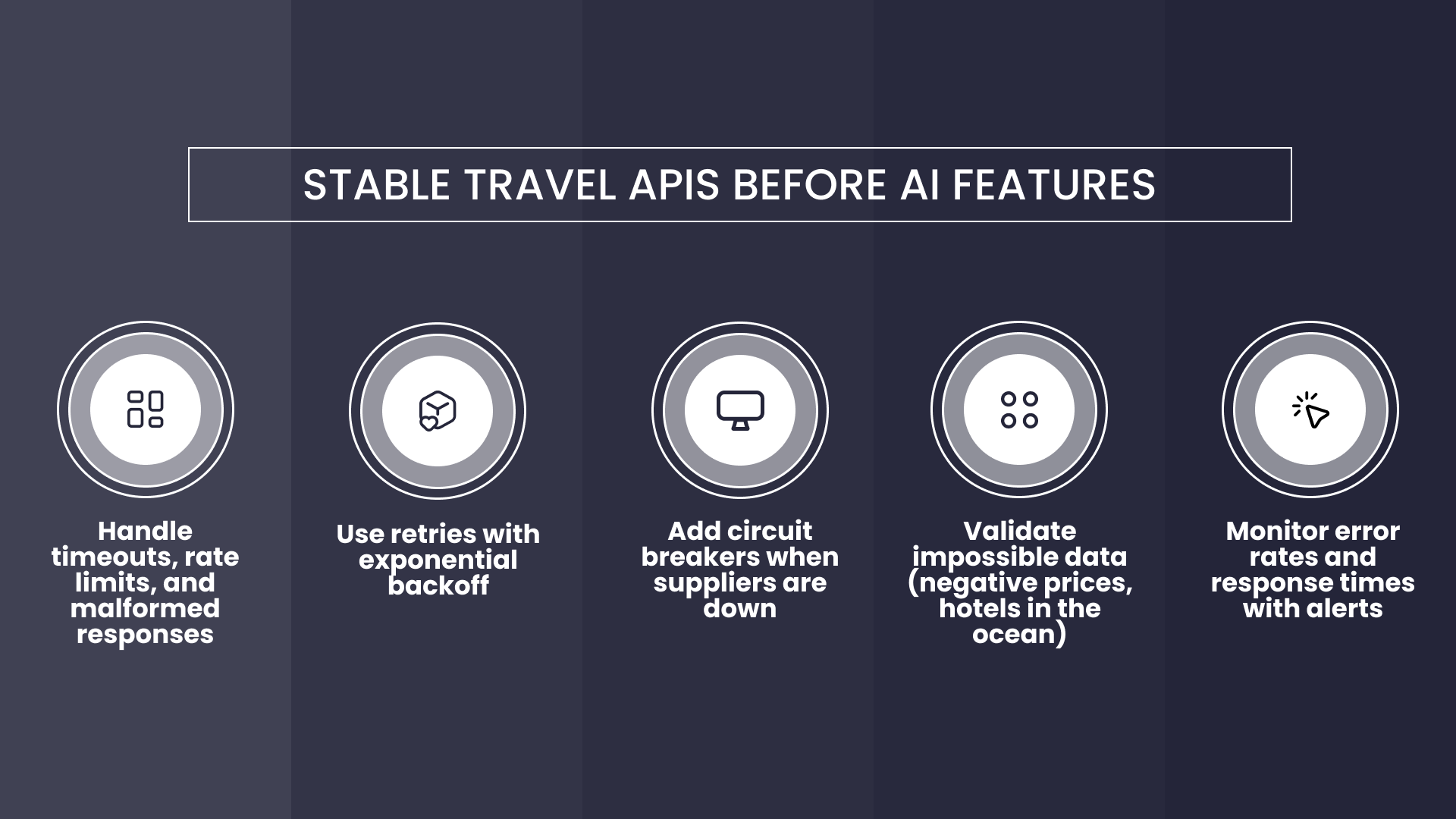
AI processing data from GDS, OTA, or PMS APIs depends entirely on those integrations being reliable. If your integrations are flaky, AI won’t fix them – it’ll amplify the problems. Understanding travel API types and integration specifics is critical to success.
The API Reliability Checklist
Comprehensive error handling. Every API call should account for timeouts, rate limits, malformed responses, and authentication failures. Different errors need different responses – timeouts warrant retries, rate limits mean backing off, malformed responses should be logged but not crash your system.
Retry logic with exponential backoff. Transient failures happen. Good integrations recover automatically without hammering the upstream service. First retry after 1 second, then 2, then 4, then 8. After a few attempts, fail gracefully and move on.
Circuit breakers. When an upstream API is down, you need to fail fast rather than backing up requests and bringing down your own system. After X failures in Y minutes, stop calling that API for Z minutes and return cached data or graceful errors instead.
This is especially important for API integrations that feed AI systems. If one supplier is down, your AI should still process data from other suppliers rather than getting stuck waiting for a response that won’t come.
Response validation. Sometimes APIs return technically valid responses that are semantically wrong – coordinates that put a hotel in the ocean, negative prices, availability dates in the past. Build validation that checks not just data types but also reasonable ranges.
Monitoring and alerting. Track success rates, response times, and data quality metrics. Set up alerts for unusual patterns – sudden spikes in errors, unusual response times, or unexpected data distributions.
Travel and Booking APIs: Сonnectivity Landscape

Where AI Belongs in Your Travel Software Architecture
There are basically three places you can insert AI into your architecture, and each has different implications:
Between API and Presentation (Most Common)
Your travel API returns results, AI processes them (reranking, enrichment, anomaly detection), and then your application displays them. This is the safest starting point – you can add it incrementally and disable it easily if something breaks.
If the AI layer fails or times out, you fall back to showing unprocessed results. Users get a slightly worse experience, but everything still works.
Parallel Processing for Analytics
AI analyzes data asynchronously without blocking your main application flow. Fraud detection on completed bookings, usage pattern analysis, data quality monitoring, review sentiment analysis. This has zero impact on user-facing performance and is perfect for new AI features because the risk is minimal.
Pre-API Filtering (Advanced)
AI optimizes what you request from APIs based on predicted user needs – natural language queries converted to structured parameters, predicted preferences narrowing searches. This can reduce API costs significantly but requires high confidence in predictions. Get it wrong, and you’re hiding perfectly good options users would’ve booked. Start with safer patterns first.
Check if your architecture is ready for AI We’ll review data, logging, and APIs, and highlight risks before you ship.
Common AI Integration Mistakes in Travel Platforms
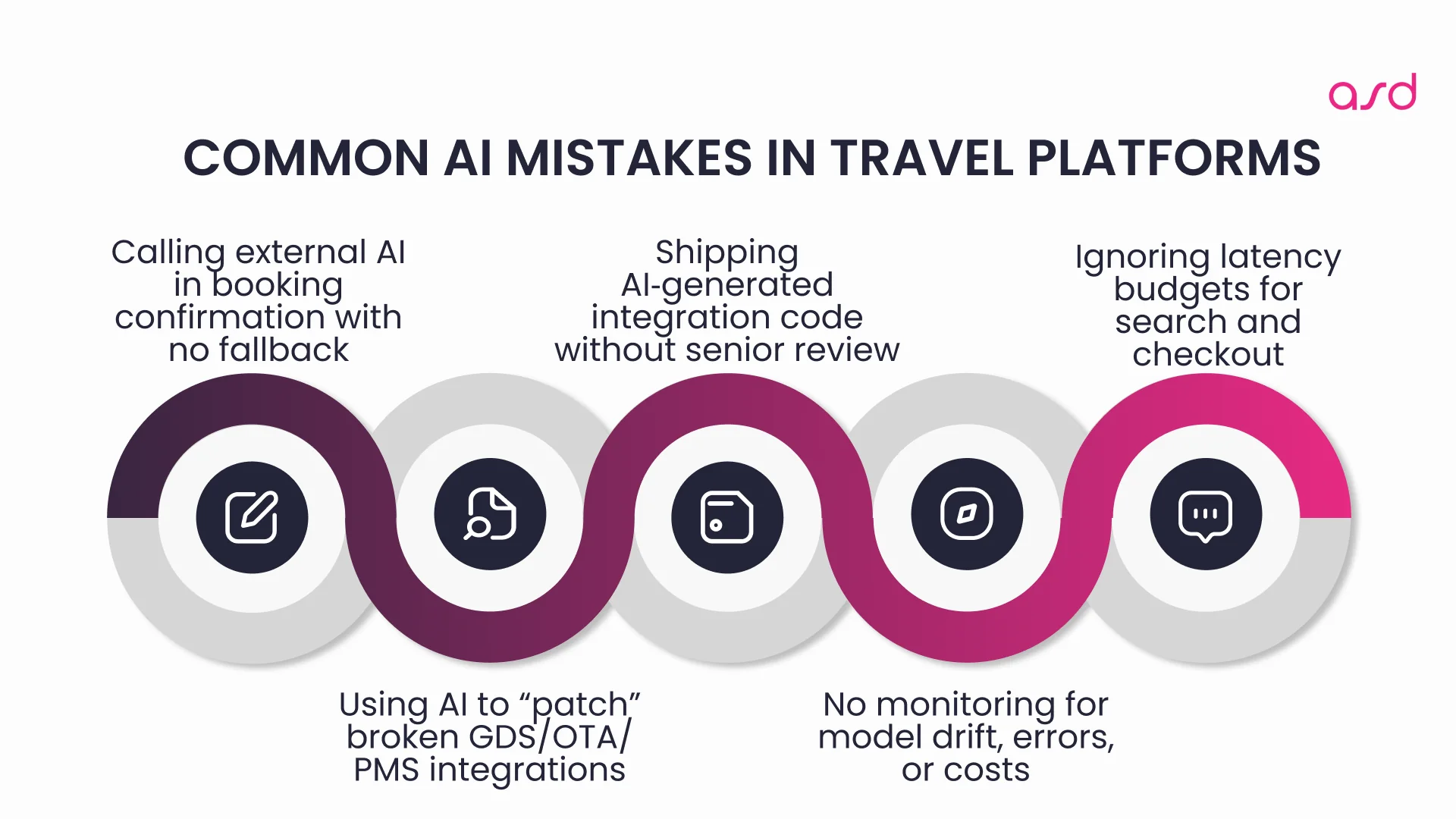
Let me save you some pain by describing what not to do:
- Don’t put real-time AI in critical paths. If your booking confirmation flow calls an external AI API and that service is slow or down, bookings fail. Always have fast fallbacks. AI should enhance, not block.
- Don’t use AI as integration glue. I’ve seen teams use LLMs to parse inconsistent data from poorly designed integrations. It sometimes works in demos but fails unpredictably in production. Fix your integrations properly.
- Don’t trust AI-generated code without review. Modern LLMs can read API documentation and generate integration code. This is great for prototyping, but APIs have nuances that documentation doesn’t capture. Use AI to speed up development, but always have experienced developers review and test generated code.
- Don’t skip the monitoring. AI systems drift over time as data distributions change. Track accuracy, processing times, and error rates. Set up alerts for when key metrics deviate from normal ranges.
- Don’t ignore latency budgets. Every AI feature adds processing time. Measure everything. Set hard limits. If an AI feature can’t consistently meet its latency requirement, move it to async processing or optimize.
What Infrastructure Do You Need Before Building AI Features
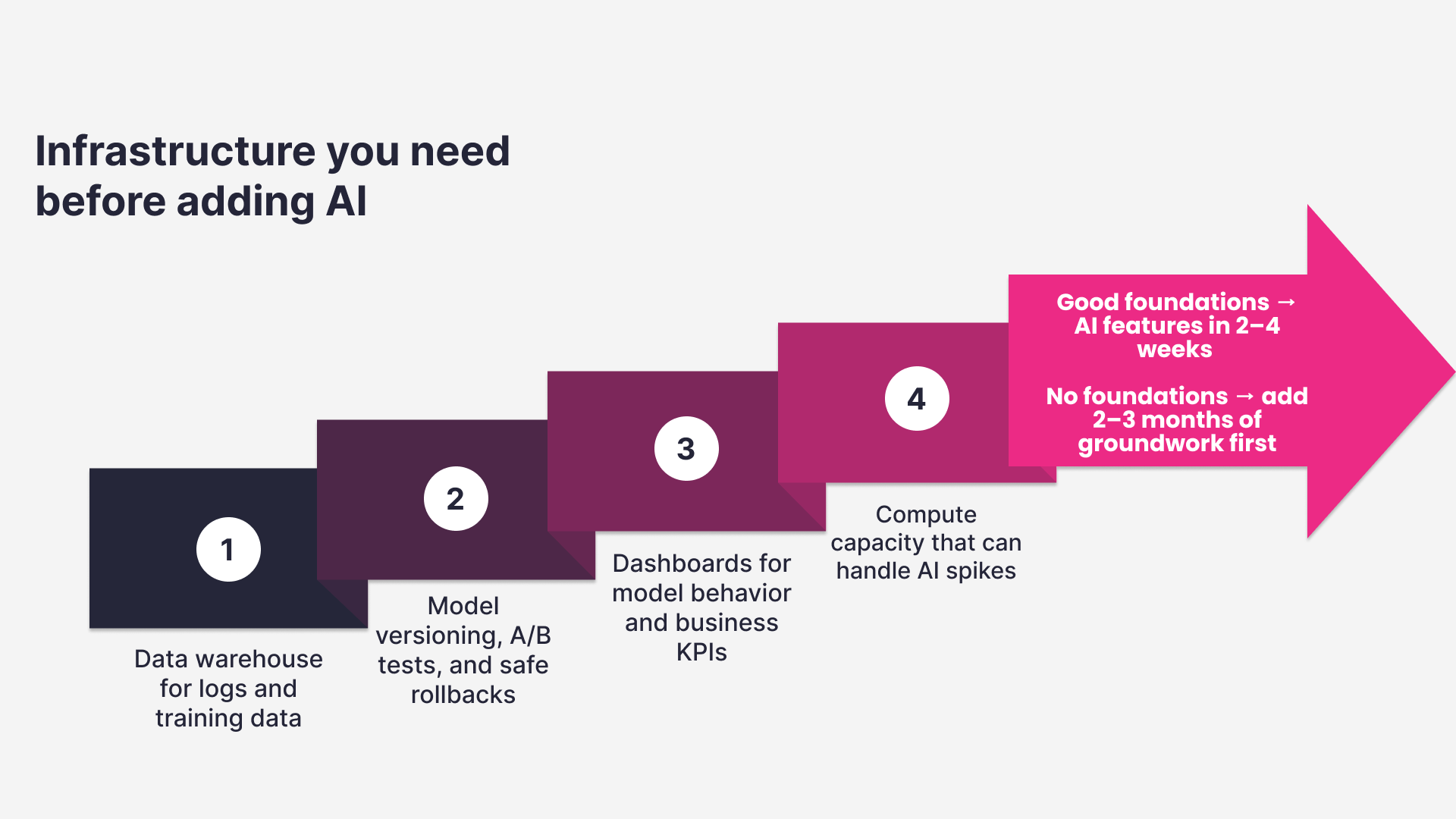
Before building AI features, ensure you have: a data warehouse for aggregating logs and training data, model versioning and deployment infrastructure for A/B tests and rollbacks, observability tooling to understand AI behavior, and compute capacity with room to grow for spiky AI workloads.
The Honest Timeline
If your architecture is already solid – clean data, structured logging, reliable integrations – individual AI features can ship in 2-4 weeks. Search reranking, ticket classification, description generation – these are tractable problems with proven solutions.
But if you need to fix data quality, build logging infrastructure, and stabilize integrations first? Add 2-3 months before you’re ready for AI work that won’t collapse under its own weight.
It’s not glamorous, but it’s honest. Teams that invest in the foundation build AI features that actually work in production. Teams that skip ahead build demos that never quite make it to real users.
The unsexy truth about successful AI in travel software development? Most of the work has nothing to do with models or algorithms. It’s about building systems that are reliable, observable, and maintainable. Get that right, and the AI part is straightforward.
Questions? Answers!
What’s the minimum data quality threshold before I should attempt AI integration?
You need consistent field formats (addresses, dates, currencies), schema enforcement that prevents malformed data entry, and clear data lineage showing where each data point originated. If you can’t reliably answer “where did this price come from?” or “why is this room type named differently than that one?”, you’re not ready. Start with a data quality audit – sample 1,000 records and manually check for inconsistencies. If you find more than 5% with format issues, fix your data pipeline before building AI features.
How long does it typically take to build proper logging infrastructure from scratch?
For a mid-sized travel platform, expect 4-6 weeks of dedicated engineering time to implement structured logging, correlation IDs, and event tracking that’s actually useful for AI training. This includes designing your log schema, updating services to emit structured events, setting up storage and querying infrastructure, and validating that you’re capturing complete user journeys. It’s not exciting work, but it’s the foundation everything else builds on. The good news is you only have to do it once.
Can I start with AI and fix integrations later?
No, and here’s why: AI amplifies the problems in your data. If your supplier integrations return stale data 5% of the time, that’s annoying but manageable when humans review results. When AI automatically processes that data, the 5% error rate gets baked into recommendations, rankings, and predictions. Users see confidently-presented wrong information, which is worse than seeing raw data they know to verify. Fix integration reliability first – get error rates below 0.1%, implement circuit breakers, add response validation. Then add AI on top.
Should I build AI infrastructure in-house or use external services?
Start with external services (OpenAI, Anthropic, AWS SageMaker, Google Vertex) for your first few AI features. They handle infrastructure complexity and let you focus on solving business problems. As you scale, evaluate which pieces make sense to bring in-house. High-volume, low-latency features like search reranking often benefit from self-hosted models. Low-volume, high-complexity features like content generation can stay on external APIs. Most successful travel platforms end up with a hybrid approach – self-hosted for performance-critical work, external APIs for everything else.
What’s the biggest mistake teams make when integrating AI into travel platforms?
Skipping the foundational work and jumping straight to AI features. They build impressive demos that work with clean test data, then deploy to production and discover their data is messy, their integrations are unreliable, and they have no way to track whether the AI is actually helping. Three months later, they’re rewriting everything. Do the boring infrastructure work first: clean your data, build proper logging, stabilize your integrations, set up monitoring. It takes longer upfront, but saves months of debugging later. The teams that succeed with AI are the ones that treat it as an infrastructure challenge, not just a feature add-on.


Related Articles:

AI Risks in Travel Tech: Hallucinations, Accuracy, Vendor Lock-in

Travel Tech AI 2026: What’s Real vs. What’s Hype

How to Build an AI Trip Planner App: The Smart, Modern Approach

Generative AI in Travel Tech: 5 Proven Use Cases We Delivered
We use cookies to personalize our services and improve your experience on this website. We may use certain personal data for analytics and marketing purposes.
Fill out the form to schedule a 30-minute call, where we’ll discuss your project requirements and explore the best solutions for your needs.